If a cardholder can't find their True Link Visa® Prepaid Card, or you notice activity you'd like to look into, temporarily deactivating the Card stops new purchases right away. Unlike a lost or stolen report, a temporarily deactivated Card can be reactivated at any time, so it's the safer choice when the Card might turn up.
In this article, you'll learn how temporary deactivation differs from reporting a Card lost or stolen, how to temporarily deactivate a Card, and how to reactivate it.
Temporarily deactivate or report lost or stolen?
- Temporarily deactivate if the Card might turn up. No one can use the Card while it's temporarily inactive, and you can reactivate it once it's found.
- Report it lost or stolen only when you're sure it's gone. We're unable to reactivate a Card that has been reported lost or stolen, so you'll need to order a new Card. If you're sure, see Replace a Lost or Stolen Card.
- You'll need full access. Only full access administrators can temporarily deactivate or reactivate a Card from the Dashboard. If you have assistant or view-only access, please ask a full access administrator on your account, or contact our Customer Support team and we can deactivate the Card for you.
How to temporarily deactivate a Card from the online dashboard
- Sign in to your Dashboard and go to the Account tab for the cardholder whose Card you'd like to deactivate. If you're not sure how to find it, see How to Navigate to Your Cardholder's Account Tab.
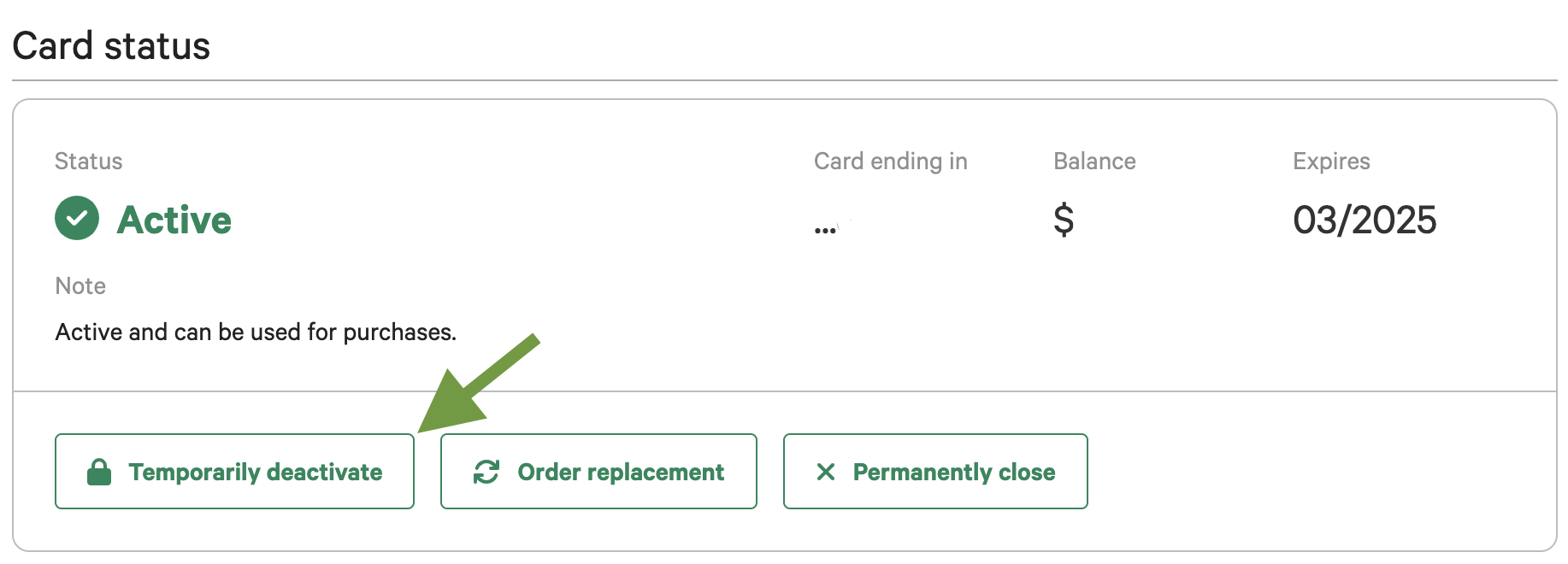
- Select Temporarily deactivate, then confirm when prompted.
Once confirmed, the Card status says "Temporarily inactive." No new purchases can be made with the Card.
If the cardholder would rather handle this themselves, they can call 1-800-299-7646 and ask to speak with our team to have their Card temporarily deactivated.
How to reactivate the Card from the online dashboard
When the Card is found, or you've confirmed everything looks right, reactivate it from the same Account tab by selecting Reactivate card. The cardholder can use the Card again as soon as it's reactivated.
How to temporarily deactivate a Card from the mobile app
- Log in to the mobile app.
- Tap the Card you'd like to deactivate.
- Tap Account details.
- Tap Lock Card.
- An informational pop-up will appear. Tap the green Lock card button.
How to reactivate the Card from the mobile app
When the Card is found, or you've confirmed everything looks right, you can Unlock the Card from the same Account details section of the mobile app, or from the Card's landing page of the mobile app by tapping the white, Unlock card button, and then the green Unlock card button. This will reactivate the Card and the cardholder can use the Card again as soon as it's reactivated.
Please be aware
- Who can reactivate. A full access administrator can reactivate the Card from the Account tab, or our Customer Support team can reactivate it at their request. If the cardholder asked our team to deactivate the Card, they can also call us to have it reactivated. If an administrator deactivated the Card, the cardholder will need to ask the administrator.
- Apple Pay and Google Pay pause too. While the Card is temporarily inactive, it won't work in Apple Wallet or Google Wallet.
What happens next
From here, you may want to:
- Replace a Lost or Stolen Card
- Fraudulent Transactions
- Ordering a replacement Card (including spare Cards for cardholders who often misplace theirs)
If you have any questions about deactivating or reactivating a Card, please don't hesitate to contact our Customer Support team.